

Whether you’re an NDIS provider or self-managed participant, knowing how to submit invoices correctly is essential. One wrong detail—or missing field—can delay payment, frustrate providers, or even risk compliance breaches.
In this guide, we’ll show you:
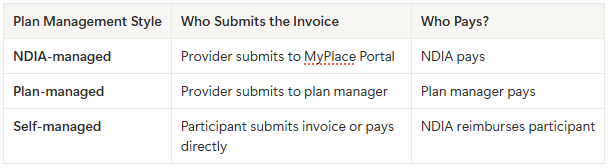
It depends on how the participant’s plan is managed:
To be accepted and paid promptly, an invoice must include the following details:
💬 Tip: Include a brief service summary if possible, especially for plan managers.
pgsql

CopyEdit

Support Worker - Community Access

Date: 01/07/2025

3 hours @ $62.17/hour (Line item 04_104_0125_6_1)

Total: $186.51
🧾 Remember: Receipts or invoices must match your approved budget line items.
🚫 Missing NDIS number
🚫 Wrong or outdated line item codes
🚫 Typos in participant name
🚫 Incomplete service descriptions
🚫 Going over pricing limits
🚫 Sending invoices to the wrong email or portal
✅ NDIS invoice templates (compliant with current pricing)
✅ Training staff on how to generate & submit invoices
✅ Reviewing rejected invoices and identifying issues
✅ Setting up MyPlace access for new providers
✅ Plan-managed invoicing process automation
Whether you’re new or scaling up, we simplify your back-end systems so you can focus on care—not chasing payments.
NDIS invoicing doesn’t need to be stressful.
Follow the right process, use accurate line items, and triple-check your invoice format to avoid errors.
A strong admin process = faster payments, fewer delays, and better provider–participant relationships.
Need help streamlining your NDIS invoicing system? Assist Providers is ready to assist.
Trusted by top Fortune 500 companies


We’ll build one for you so you can focus more on doing what you love in your business.
Book a callWork with our expert funnel strategists, media buyers, copywriters, creative strategists, and sales consultants, to
Gone are the days of managing teams of freelancers and spending countless hours learning how to do what we do best.
book a call

